> ## Documentation Index
> Fetch the complete documentation index at: https://docs.cloudglue.dev/llms.txt
> Use this file to discover all available pages before exploring further.
# Webhooks
> Use our webhooks to get notifications when your jobs are updated
## Why use webhooks?
Depending on the length and size of the video, some jobs can take some time to complete.
Instead of polling the API for the status of the job, you can use webhooks to get notified when the job is updated.
## Creating a webhook
You can create a webhook by going to our [webhooks page](https://app.cloudglue.dev/home/webhooks) and clicking the `Create Webhook` button.
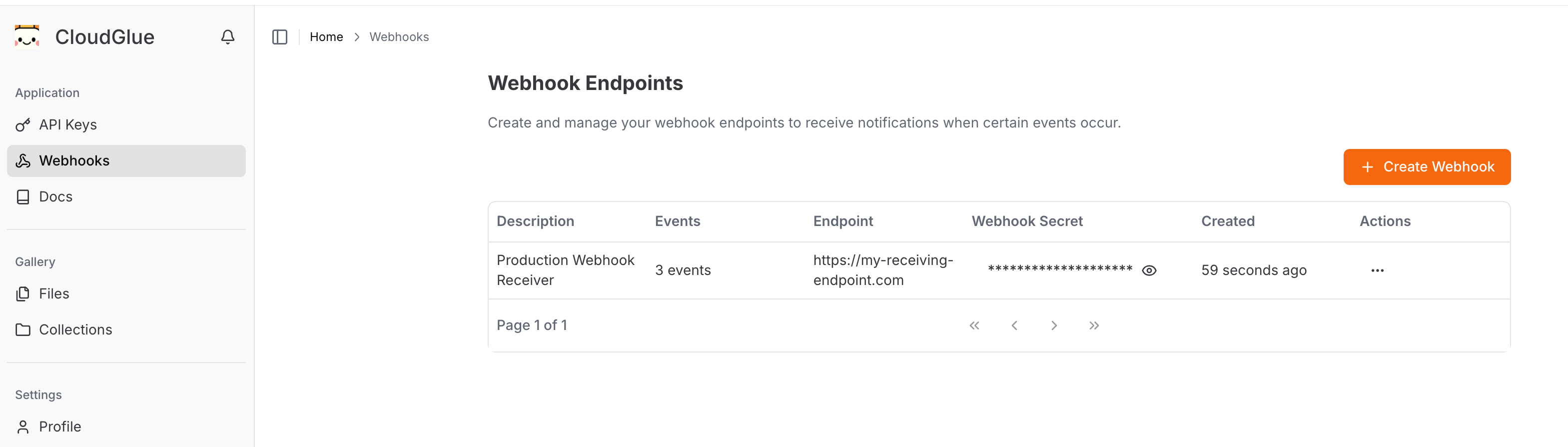 From there you can specify the following:
* The URL to send the webhook to
* The events to subscribe to
* Optionally, a description about the webhook for your own reference
From there you can specify the following:
* The URL to send the webhook to
* The events to subscribe to
* Optionally, a description about the webhook for your own reference
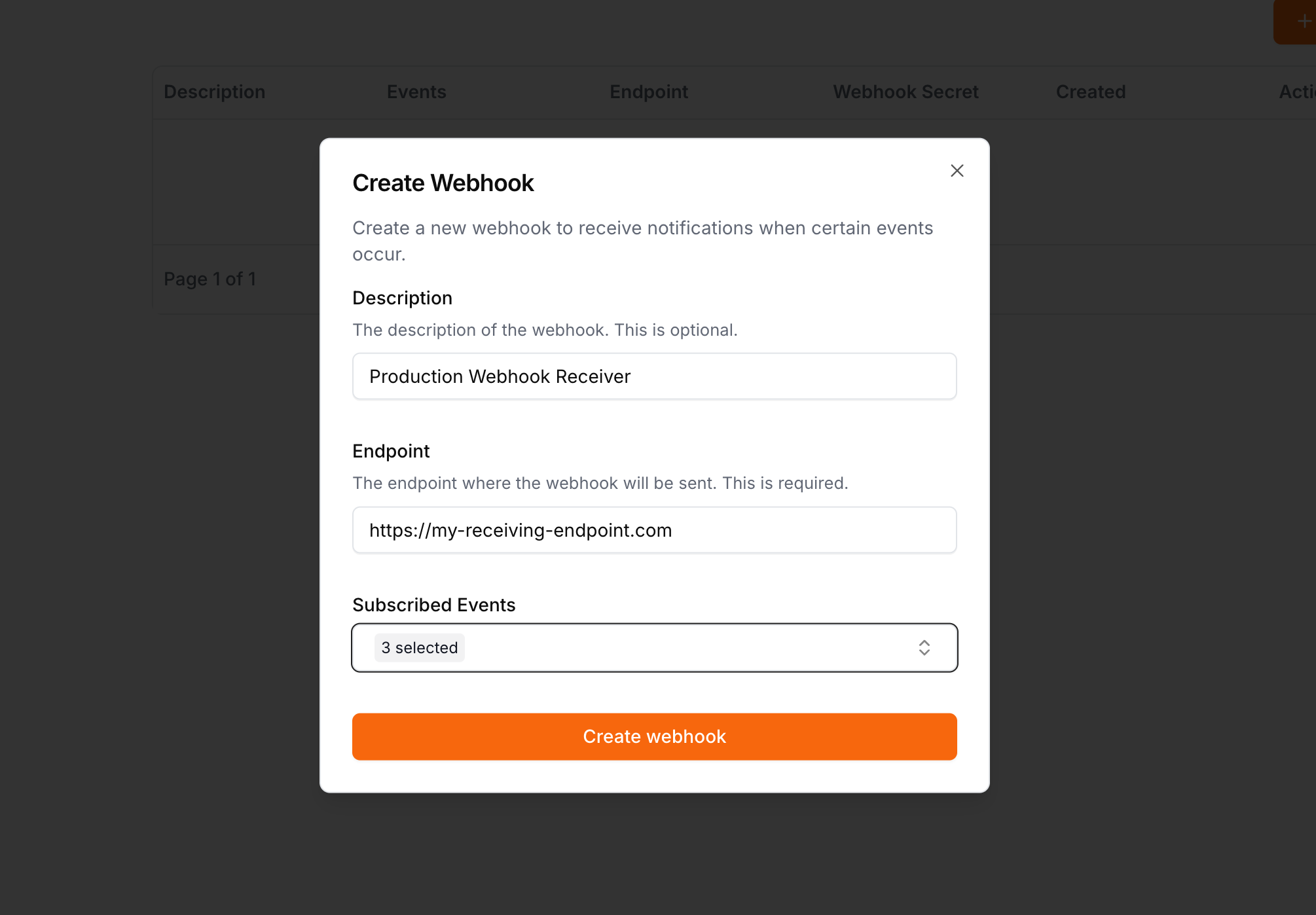 Each webhook endpoint requires at least one event to be subscribed to.
***
## Supported events
Currently we support the following events:
### Describe Job
* `describe.job.processing`
* `describe.job.completed`
* `describe.job.failed`
### Extract Job
* `extract.job.processing`
* `extract.job.completed`
* `extract.job.failed`
### File Job
* `file.job.processing`
* `file.job.completed`
* `file.job.failed`
* `file.job.deleted`
### Collection File Job
* `collection.file.job.processing`
* `collection.file.job.completed`
* `collection.file.job.failed`
* `collection.file.job.deleted`
### Segment Job
* `segment.job.processing`
* `segment.job.completed`
* `segment.job.failed`
You can subscribe to multiple events for the same endpoint.
***
## Verifying the webhook
To verify that the events you are receiving are from Cloudglue, we send a header with each request that contains the webhook secret for your particular endpoint.
By comparing the secret in the header to the secret for your endpoint, you can verify that the request is in fact from Cloudglue.
You can find the webhook secret for an endpoint by going to the [webhooks page](https://app.cloudglue.dev/home/webhooks).
Each webhook endpoint requires at least one event to be subscribed to.
***
## Supported events
Currently we support the following events:
### Describe Job
* `describe.job.processing`
* `describe.job.completed`
* `describe.job.failed`
### Extract Job
* `extract.job.processing`
* `extract.job.completed`
* `extract.job.failed`
### File Job
* `file.job.processing`
* `file.job.completed`
* `file.job.failed`
* `file.job.deleted`
### Collection File Job
* `collection.file.job.processing`
* `collection.file.job.completed`
* `collection.file.job.failed`
* `collection.file.job.deleted`
### Segment Job
* `segment.job.processing`
* `segment.job.completed`
* `segment.job.failed`
You can subscribe to multiple events for the same endpoint.
***
## Verifying the webhook
To verify that the events you are receiving are from Cloudglue, we send a header with each request that contains the webhook secret for your particular endpoint.
By comparing the secret in the header to the secret for your endpoint, you can verify that the request is in fact from Cloudglue.
You can find the webhook secret for an endpoint by going to the [webhooks page](https://app.cloudglue.dev/home/webhooks).
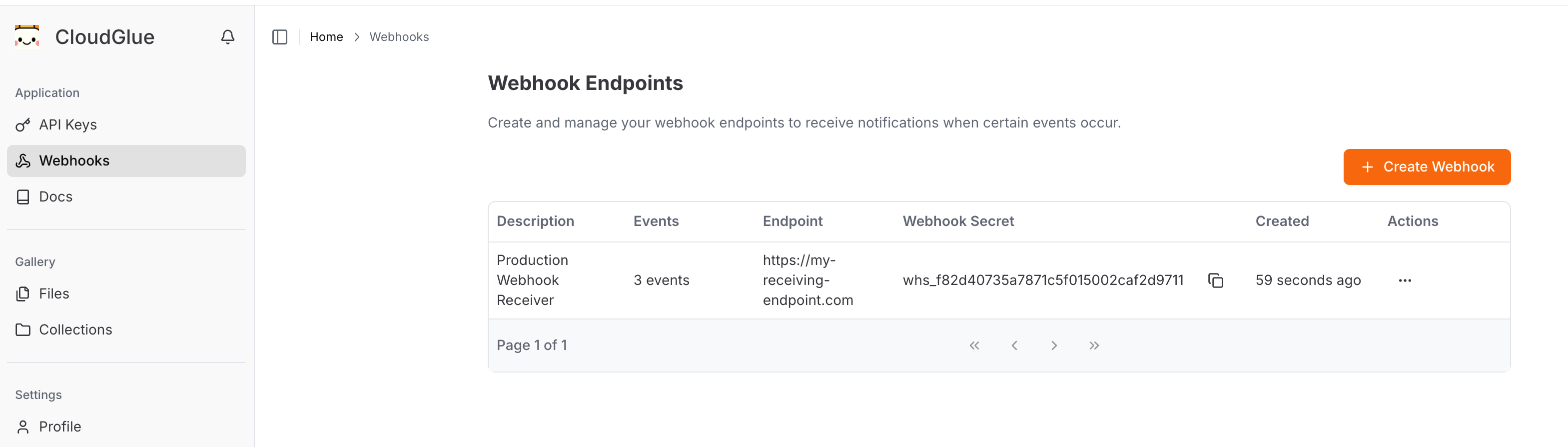 Example Header:
```
X-Cloudglue-Webhook-Secret: your-webhook-secret
```
***
## Payload
The payload will vary depending on the event.
It will always be a POST request with a JSON body.
### File Payload
```json theme={null}
{
"event_id": "string",
"event_type": "string",
"payload": {
"file_id": "string",
"uri": "string",
"filename": "string",
"metadata": "Record",
"bytes": "number",
"status": "pending | processing | completed | failed",
"created_at": "string"
}
}
```
### Describe Payload
```json theme={null}
{
"event_id": "string",
"event_type": "string",
"payload": {
"job_id": "string",
"url": "string",
"status": "pending | processing | completed | failed",
"created_at": "string",
"describe_config": "Record"
}
}
```
### Extract Payload
```json theme={null}
{
"event_id": "string",
"event_type": "string",
"payload": {
"job_id": "string",
"url": "string",
"status": "pending | processing | completed | failed",
"extract_config": "Record",
"created_at": "string"
}
}
```
### Collection File Payload
```json theme={null}
{
"event_id": "string",
"event_type": "string",
"payload": {
"collection_id": "string",
"file_id": "string",
"created_at": "string",
"status": "pending | processing | completed | failed",
"added_at": "string"
}
}
```
### Segment Payload
```json theme={null}
{
"event_id": "string",
"event_type": "string",
"payload": {
"job_id": "string",
"created_at": "string",
"status": "pending | processing | completed | failed",
"file_id": "string",
"criteria": "string",
"segments_config": "Record"
}
}
```
To view the full object details, we recommend using the SDKs or APIs to make a request to fetch that object.
For more information on the full object details, please refer to the following sections:
* [Describe](/api-reference/endpoint/describe/get)
* [Extract](/api-reference/endpoint/extract/get)
* [File](/api-reference/endpoint/files/get-id)
* [Collection File](/api-reference/endpoint/collections/file-get)
***
## Response
The endpoint expects you to return a HTTP 200 status code to confirm receipt of the webhook.
If you return a non-200 status code, we will retry the webhook up to 3 times.
***
## Error Handling
If you return a non-200 status code, we will retry the webhook up to 3 times.
After 3 retries, we will stop retrying the event and mark it as failed.
## Viewing past webhook events
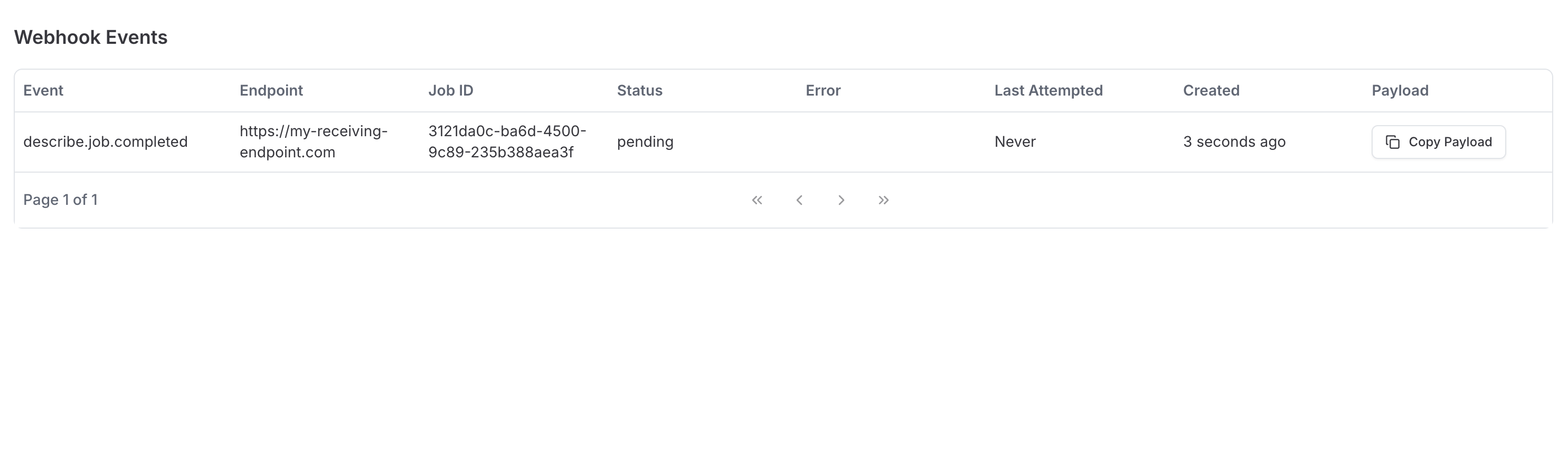
You can view past webhook events by going to the [webhooks page](https://app.cloudglue.dev/home/webhooks), and clicking the `View Events` button for an endpoint.
Example Header:
```
X-Cloudglue-Webhook-Secret: your-webhook-secret
```
***
## Payload
The payload will vary depending on the event.
It will always be a POST request with a JSON body.
### File Payload
```json theme={null}
{
"event_id": "string",
"event_type": "string",
"payload": {
"file_id": "string",
"uri": "string",
"filename": "string",
"metadata": "Record",
"bytes": "number",
"status": "pending | processing | completed | failed",
"created_at": "string"
}
}
```
### Describe Payload
```json theme={null}
{
"event_id": "string",
"event_type": "string",
"payload": {
"job_id": "string",
"url": "string",
"status": "pending | processing | completed | failed",
"created_at": "string",
"describe_config": "Record"
}
}
```
### Extract Payload
```json theme={null}
{
"event_id": "string",
"event_type": "string",
"payload": {
"job_id": "string",
"url": "string",
"status": "pending | processing | completed | failed",
"extract_config": "Record",
"created_at": "string"
}
}
```
### Collection File Payload
```json theme={null}
{
"event_id": "string",
"event_type": "string",
"payload": {
"collection_id": "string",
"file_id": "string",
"created_at": "string",
"status": "pending | processing | completed | failed",
"added_at": "string"
}
}
```
### Segment Payload
```json theme={null}
{
"event_id": "string",
"event_type": "string",
"payload": {
"job_id": "string",
"created_at": "string",
"status": "pending | processing | completed | failed",
"file_id": "string",
"criteria": "string",
"segments_config": "Record"
}
}
```
To view the full object details, we recommend using the SDKs or APIs to make a request to fetch that object.
For more information on the full object details, please refer to the following sections:
* [Describe](/api-reference/endpoint/describe/get)
* [Extract](/api-reference/endpoint/extract/get)
* [File](/api-reference/endpoint/files/get-id)
* [Collection File](/api-reference/endpoint/collections/file-get)
***
## Response
The endpoint expects you to return a HTTP 200 status code to confirm receipt of the webhook.
If you return a non-200 status code, we will retry the webhook up to 3 times.
***
## Error Handling
If you return a non-200 status code, we will retry the webhook up to 3 times.
After 3 retries, we will stop retrying the event and mark it as failed.
## Viewing past webhook events
You can view past webhook events by going to the [webhooks page](https://app.cloudglue.dev/home/webhooks), and clicking the `View Events` button for an endpoint.
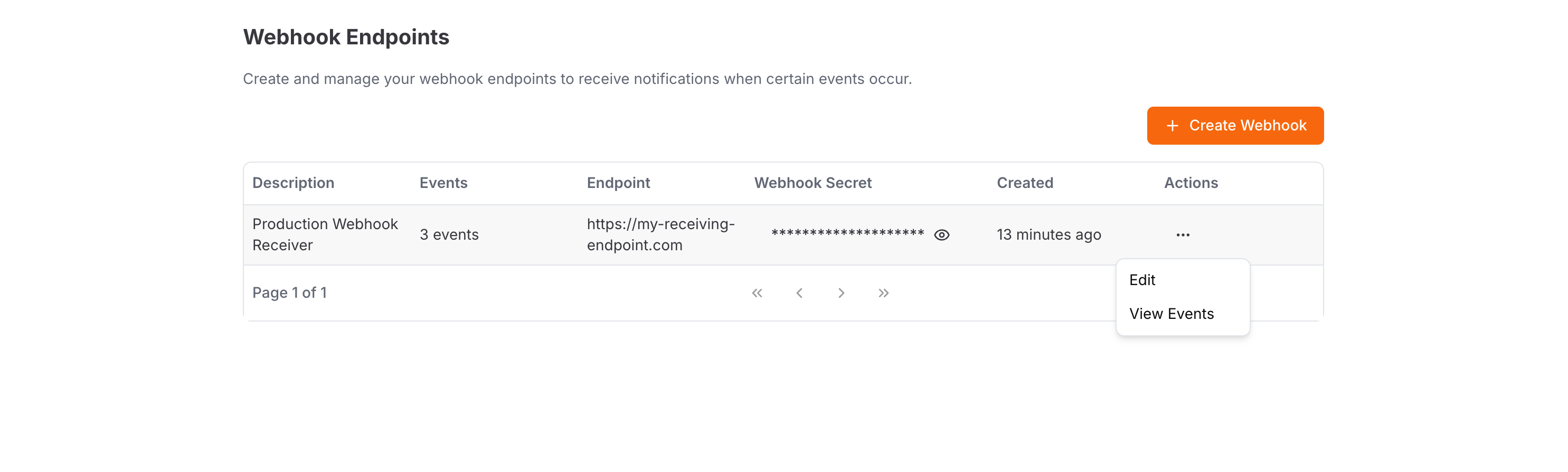 This will take you to a page where you can see the past events for an endpoint.
 ***
## Other
You can make up to 10 webhook endpoints per account.
***
***
## Other
You can make up to 10 webhook endpoints per account.
***